
—— 需求分析
- 方法不能太复杂:不需要太多专业的网络/计算机技能
- 功能不能太简单:可定制,方便发表博客文章
为什么不使用【自助建站工具】
其实,如果需求极为简单,推荐使用免费自助建站工具,比如上线了,我就曾经建立了一个简单页面——生物制造研发团队。
这种方法就像做PPT一样。就是在别人的网站上编辑了一个页面,而且有模板。
但,有些限制:
- 形式和功能有限,比如想发表很多页面的博客文章就没法实现,想用自己的域名也不行,有些功能需要付费
- 数据安全性有些担心,毕竟数据是存放在人家的服务器上,担心有一天这家公司有什么变化
故,我决定自己购买域名和服务器,查询了各种方法,最终找到了个人感觉最简单容易的方法——
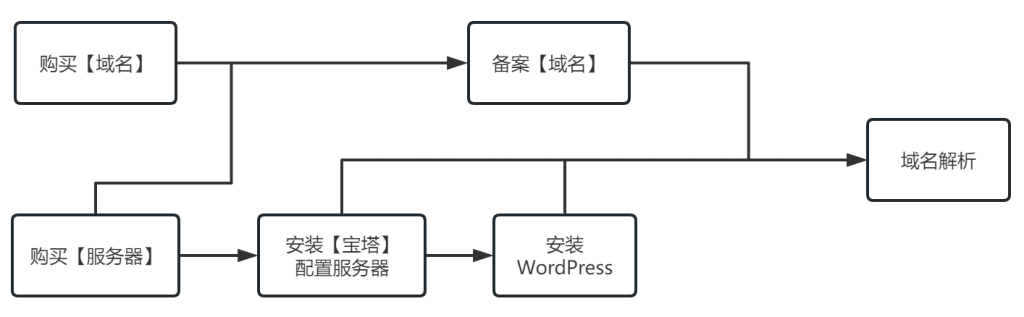
本文方法总结
如下图。注意先后顺序。
购买域名
每个网站都要有域名,相当于网站“在网络上的名字”,比如本站的域名就是 wangheran.com。(每年约80元)
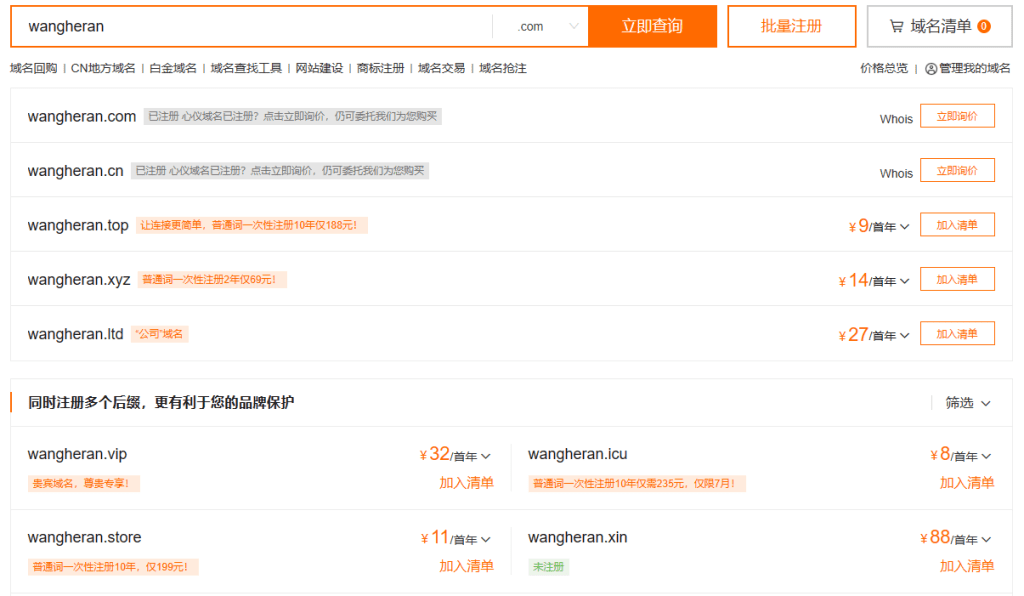
注1:.com是最主流的,因此也最贵;其实完全可以选择更便宜的,如 .top。
注2:关注“阿里云企航”公众号有优惠口令。
服务器:购买与配置
网站上的内容必须能储存一个地方,这就是服务器。
服务器其实也可以理解为一台电脑,只不过它24小时不停运转,自动地把网站的内容传送给访问它的人。
购买服务器
我也是在阿里云上买的,选择了【产品】-【云服务器 ECS】-【立即购买】 – 【快速购买】,我选的1核2G,对个人网站来说够用了。
购买时要选择【地域】,可以先用测速工具——阿里云Ping——测一下各个节点速度,选最快的。同时也可以考虑阿里的优惠位置,比如我就选了“乌兰察布”的服务器,因为有优惠,并且也不慢。(每年约600元)
系统选 CentOS7.9,其实就是一种linux,做服务器的话,效率比Windows高,而且后面实际上发现,完全不用担心不会使用这个操作系统。
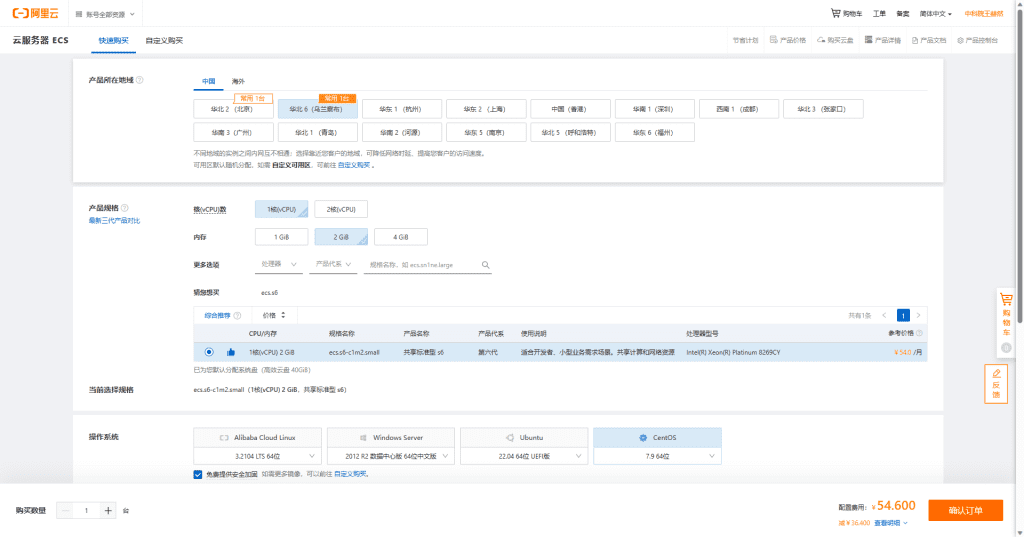
注:第一次购买的用户,千万不要选【免费试用】,因为这样的话就没有初次购买的巨大优惠了呀(多花了好多钱的就是我,悲伤~)。
去服务器上玩儿一下
进入云服务器ECS【控制台】就能看到,自己刚买的服务器,我们一般把服务器叫做【实例】。
把自己服务器的【公网IP】保存下来,一般长这个样子:39.105.114.216。
这时可以点【重置实例密码】,设置密码后需要“重启”服务器。
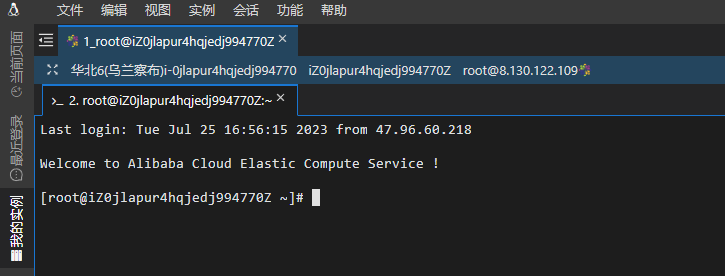
点击【远程连接】,登录,出现下面这个“远程连接”黑界面,就可以理解为,你已经成功远程控制你的服务器了。
宝塔面板
这是一个神软件,有了它,服务器的管理就很简单了,几乎都是一键式操作。
把宝塔面板软件安装到服务器上
官网(宝塔面板) – 【立即免费安装】 – 【Linux面板7.9】 – 【安装脚本】 – 复制CentOS安装脚本
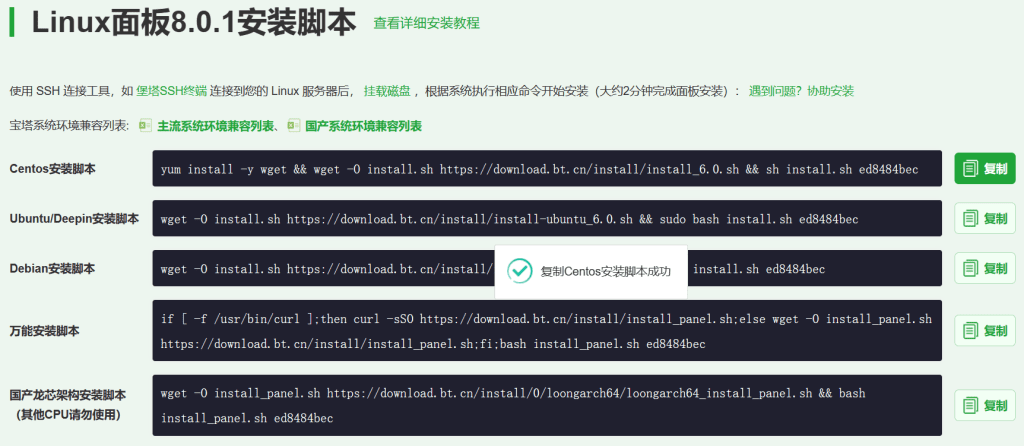
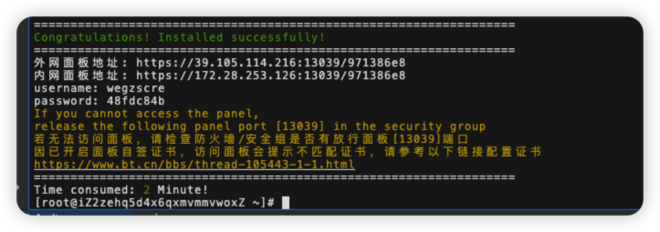
将安装脚本粘贴到远程连接(前面的黑色控制台)中,回车,一路 y(yes)。看到 Installed successfully 代表安装成功。
注意:一定把下面的信息保存好。其中要用到的是:外网面板地址、username、password、 port号(在中括号中的5位数)
给服务器添加端口:允许外界访问它的窗口
回到阿里云控制台 – 安全组 – 点击实例名称 – 入口向 – 手动添加两个端口:
- 端口范围:80/80 (代表从80到80);源:0.0.0.0/0 (代表所有IP都能访问)
- 端口范围: 13039/13039;源:0.0.0.0/0 (此处的5位数就是上面保存的中括号中的5位数)
保存。
登录宝塔面板
宝塔面板是需要账号的,如果没有的话,注册一个。
在浏览器中,输入上面保存的【外网面板地址】,使用上面保存的【username】和【password】登录。
绑定宝塔账号。
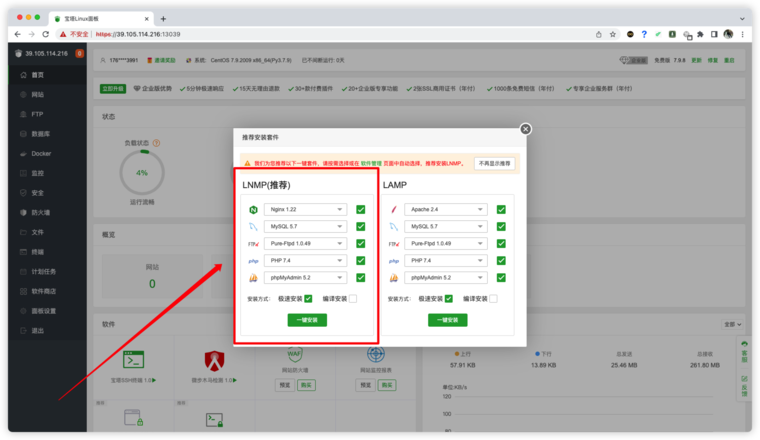
第一次来到宝塔面板(注意不是宝塔账号的“会员后台”),会推荐你安装LNMP运行环境。点击一键安装即可。(10-20分钟)
WordPress
一键部署 WordPress
点击左侧的【软件商店】 – 点击顶部的【一键部署】 – 一键部署 WordPress
修改弹窗中的信息,域名填写自己服务器的公网地址,根目录修改成如图所示,修改数据库的账号密码。
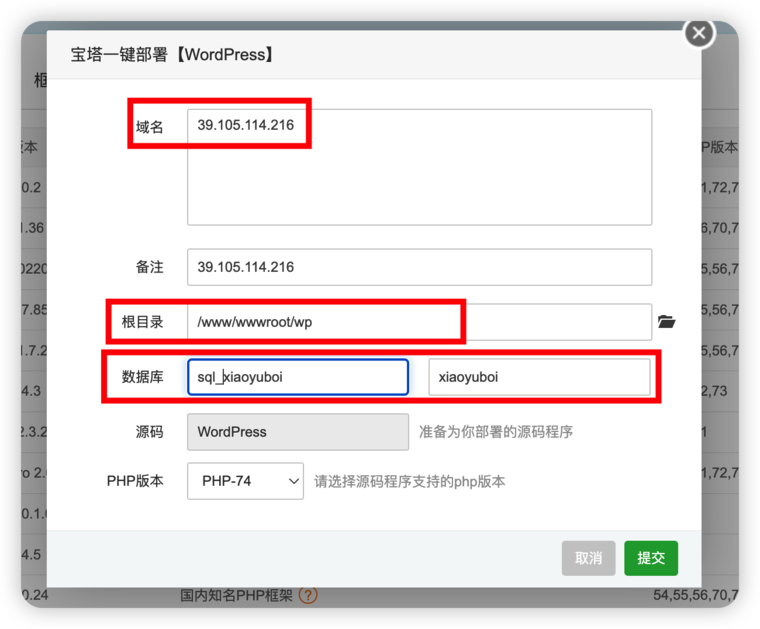
注:数据库名与密码不要出现大写字母。(我第一次有大写字母就失败了,那就在宝塔面板左侧找到【数据库】,把刚建立的数据库删掉,重新再来就好了)
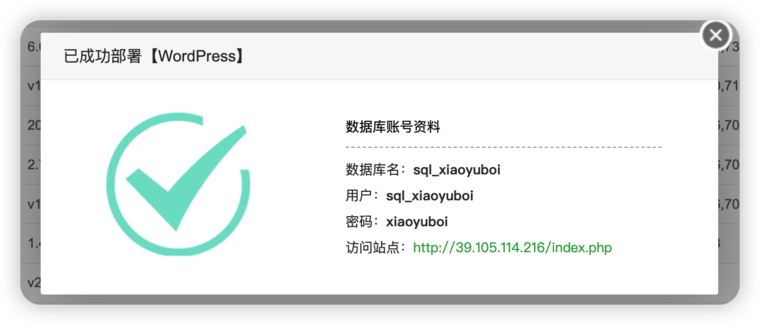
返回此信息,代表部署成功!图中的信息要复制保存,下面会用。比如数据库名、用户、密码、访问站点。
初始化WordPress
把上面保存的【访问站点】复制到浏览器中,输入数据库名、用户、密码,一路即可完成安装。
登录WordPress后台
WordPress后台,就是:【你的服务器公网地址】/wp-login.php
账号密码,就是刚才设置的。
到这里,已经完成了环境的搭建。
也就是说,你的网站已经可以访问了。怎么访问呢?只需要在你的浏览器中输入【你的服务器公网地址】,就能访问了。
以上主要参考:0基础也能搭建个人网站!-阿里云开发者社区 (aliyun.com)
域名备案
在阿里云首页右上角即有 ICP备案 入口。
备案时,是需要“服务码”的,这是购买服务器后免费赠送的。(因此要先买服务器,再备案)
域名解析
域名解析,就是把域名和服务器IP地址关联起来。
阿里页面操作
在域名解析页面,点击解析设置,进入解析设置页面。在解析设置页面,点击新手引导 – 网站解析 – 输入服务器IP地址
如何添加网站解析,实现网站可访问_云解析 DNS-阿里云帮助中心 (aliyun.com)
宝塔页面操作
此时还没有完成解析,需要在宝塔面板下操作:
宝塔 – 网站 – 设置 – 域名管理
WordPressd页面操作
这时,咱们发现主页已经解析成功,但是其它页面都还是原来的 服务器IP地址。
这时,在Wordpress后台,将设置修改为新的域名,即可。
建站完成
至此,建站就已经完成。
后面的工作,就是使用 WordPress 工具来愉快的编辑网站内容了~
结语
从无到有,个人网站就像是自己的孩子。
从此,思想有了个家。
http://kirilexs.nnov.org/o-sebe/melbet_promokod_bez_depozita__wap200.html
эскорт услуги Красноярск
https://almirwell.ru/%D0%BE-%D0%BC%D0%B5%D1%82%D0%BE%D0%B4%D0%B8%D0%BA%D0%B5/
заказать эскорт в Красноярске
https://det.ru/
Hello folks!
I came across a 183 fantastic website that I think you should browse.
This tool is packed with a lot of useful information that you might find valuable.
It has everything you could possibly need, so be sure to give it a visit!
https://scienceprog.com/3-important-technologies-of-recent-years/
And don’t neglect, folks, — you always are able to within this article discover solutions to address the the very confusing questions. The authors attempted to present all data using an very accessible way.
Hello !!
I came across a 183 fantastic page that I think you should explore.
This tool is packed with a lot of useful information that you might find interesting.
It has everything you could possibly need, so be sure to give it a visit!
https://downrightcreepy.com/top-4-scariest-horror-movies/
And don’t forget, everyone, that you constantly can inside the publication find solutions to address the most the very complicated queries. Our team made an effort — lay out the complete content via the extremely easy-to-grasp way.
Hello friends!
I came across a 183 great website that I think you should check out.
This platform is packed with a lot of useful information that you might find valuable.
It has everything you could possibly need, so be sure to give it a visit!
https://biographywiki.net/timeless-charm-of-womens-fashion/
Additionally don’t overlook, everyone, that one always are able to within this publication find responses to the most tangled inquiries. The authors tried to explain the complete information using the most most understandable way.
Hello team!
I came across a 183 very cool website that I think you should explore.
This tool is packed with a lot of useful information that you might find valuable.
It has everything you could possibly need, so be sure to give it a visit!
https://pantheonuk.org/business-and-tech-the-digital-transformation-of-modern-enterprises/
Additionally remember not to neglect, folks, — one constantly may within this particular publication find responses to address your most confusing inquiries. We made an effort to explain the complete information in the extremely easy-to-grasp manner.
Hello guys!
I came across a 183 interesting platform that I think you should check out.
This site is packed with a lot of useful information that you might find insightful.
It has everything you could possibly need, so be sure to give it a visit!
https://www.pridemagazine.com/the-radiant-guide-to-afro-hair-care/
And do not forget, folks, that one constantly may inside the publication discover answers for your the absolute confusing queries. We made an effort to explain the complete content using the most extremely accessible method.
https://detivetra.ru/
https://www.navacool.com/forum/topic/515452/c%C3%B3digo-promocional-1xbet-angola:-1xbig2026—130-%E2%82%AC-deportivo
https://ezylinkdirectory.com/listings13646907/what-is-1xbet-bonus-code-2027-1xbig200
https://www.pixiv.net/en/users/127523151
https://www.celsocarvalho.com/profile/elenecrowleyepk6s86668/profile
https://gravesales.com/author/1xbetpromo2027/
https://www.udocz.com/profile/11654754/1xbet-sign-up-promo-code-1xbig200-new-player-bonus
https://allmyfaves.com/betwinner2027
https://www.democracylab.org/user/54371
https://forums.demigodgame.com/User/7677859